Your world becomes
a memory album.
Warp is a planet memory album for people who want more than another dead gallery dump buried inside a phone.
Tap the globe. Choose a place. Save a moment. Build an album around where life actually happened.
The concept is simple and strong: locations become anchors, memories become albums, and your world starts to look like your world instead of a random pile of files.
Warp is now moving through product polish and stabilization, and testing interest is open for people who want early access, updates or a chance to give feedback.
Inside Warp
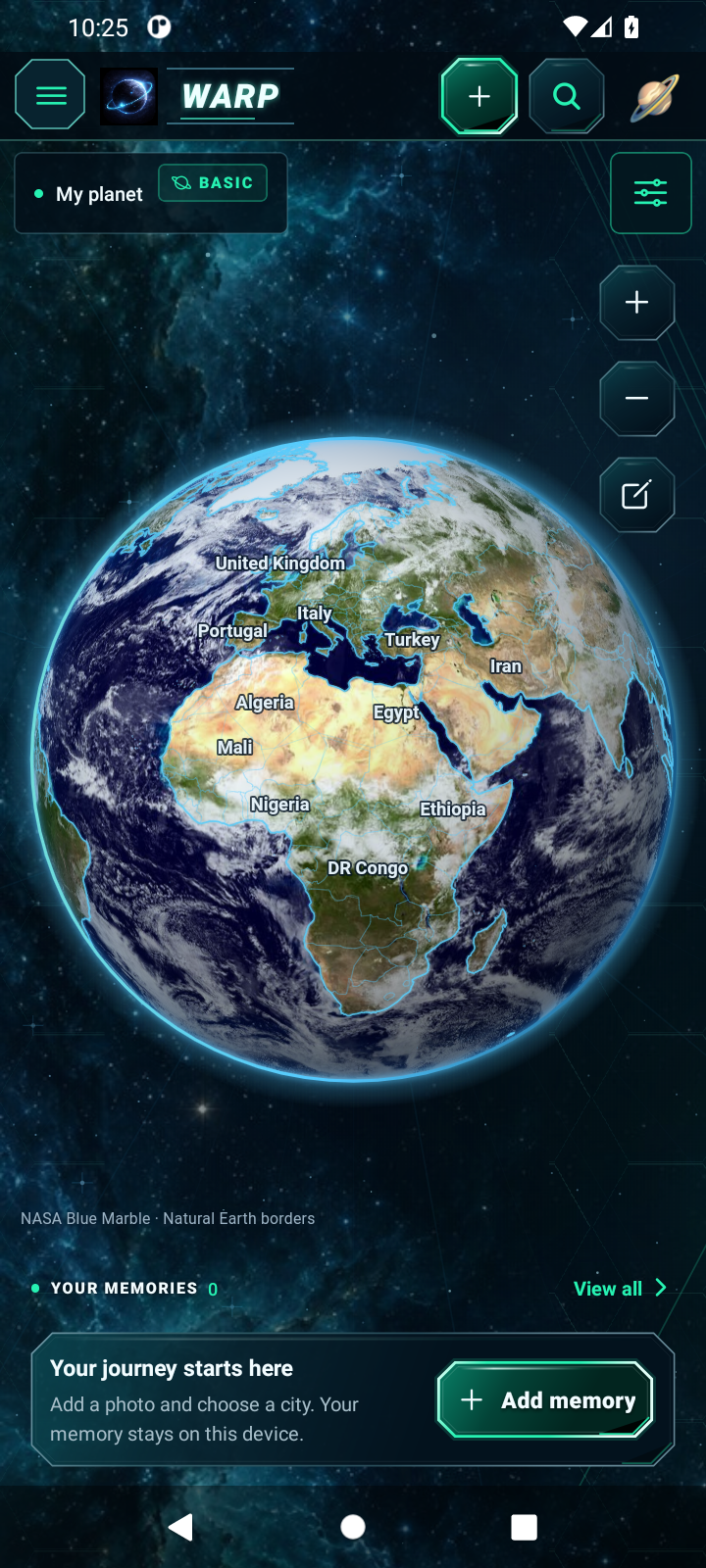
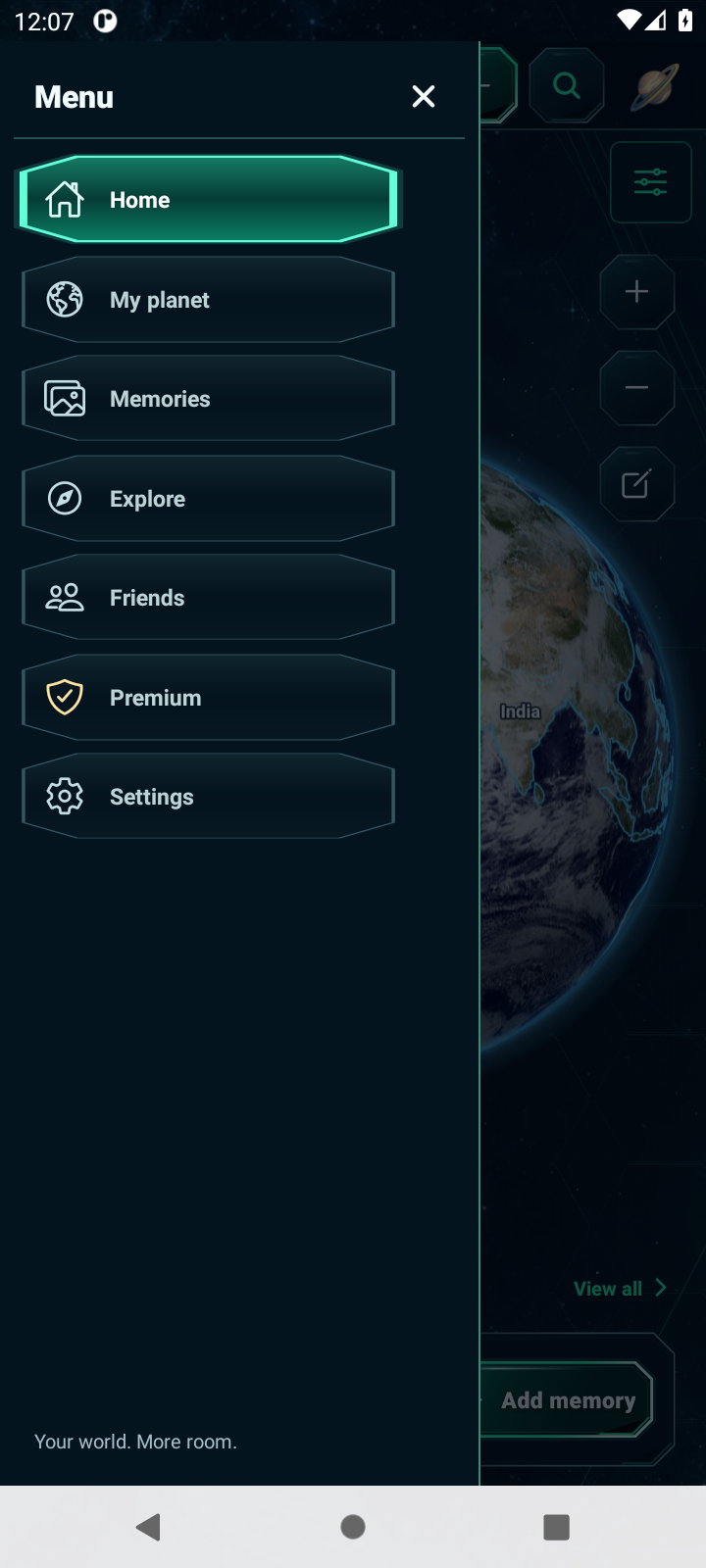
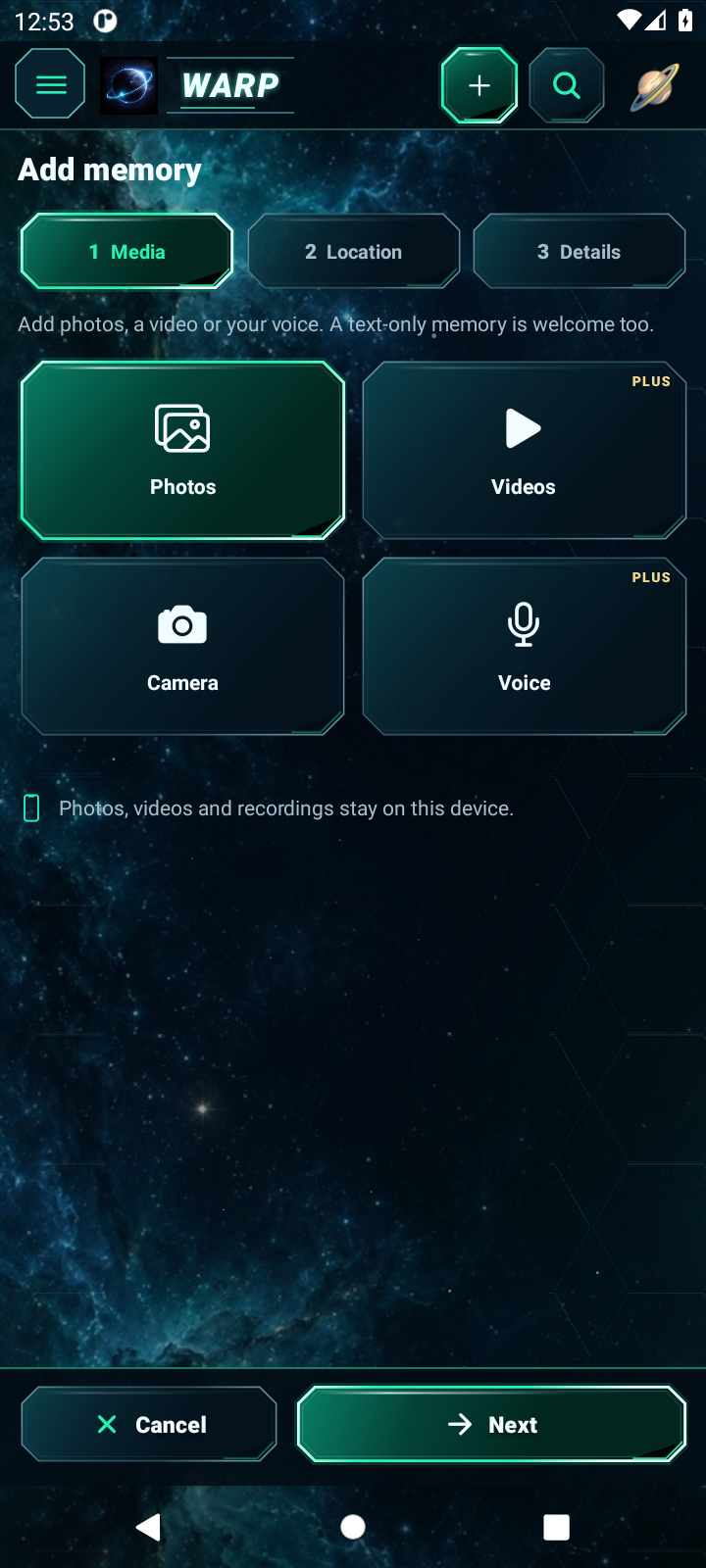
Captured from the Android app. Select a screenshot to view it at full size.
Why Warp stands out
A lightweight, gently rotating globe for your place-based memory albums.
Your album on a living globe
Explore your memories on a smooth 3D globe with crisp stars, pins, labels and direct zoom controls. No 2D map switch.
Locations become memory anchors
Saved places can appear as meaningful points on the globe, turning geography into part of the album experience.
Moments tied to where they happened
Photos and videos stop floating in chaos and start living inside a place-based memory structure.
Memories with structure
Browse saved moments, select a place on the globe and edit its album. Route tracking can save a travelled route as a memory.
Personal identity layer
Modern profile and avatar choices, a local guest mode, and optional email or Google sign-in with Firebase Authentication.
Friend planets and pineapples
Choose memories to share as a code, import a friend's planet snapshot, and send a small 🍍 reaction using your chosen share app. Photos stay on your device.
About the app
Cinematic in feel. Practical in product logic.
Warp is being built as a premium Android-first experience around memory, place and visual identity.
The core idea is not complicated: the user taps the globe, adds a location and creates a memory album with photos or videos. Saved places can appear as pins on the globe, and each saved place can open its own album.
A swipeable globe toolbar brings albums, location, tracking, labels and edit controls together. The planet rotates gently until you interact with it.
Memories and photos are stored locally. Shared friend planets are text and location snapshots exchanged through Android's share sheet. Screenshot protection inside Warp can limit captures on supported Android devices.
Testing & feedback
Early interest is open now.
Want to join the Warp testing wave?
Warp is in stabilization and product-polish mode right now. That makes this the right time for early supporters, testers and curious users to get in touch.
If you want to ask about access, test builds, future rollout or feedback opportunities, use the contact below and put yourself on the radar.
Warp privacy and terms
Local media, account, friend-request and Family metadata, Google Play subscriptions, Free-plan advertising and account deletion.
Warp — Privacy PolicyUpdated 31 October 2026 · contact@invictuspdm.uk⌄
This notice describes the Warp app and its account/support services. Your browser and the website hosting providers also process the network requests needed to display this page.
Operator and contact
Invictus PDM operates Warp. For privacy questions or data-rights requests, email contact@invictuspdm.uk. Updated 31 October 2026.
Personal albums and media
Your personal memories, photos, videos, places, routes, profile preferences, imported contacts and received friend-planet snapshots are stored on your device. The current release does not upload your album media or provide cloud media backup. Manual backup/export creates a copy that you choose where to keep or share; you control those copies separately.
Permissions
Warp requests optional camera/media, location and contacts permissions when you choose a feature that needs them. Location supports positions or routes you select; contact import uses the contacts you choose. You can decline optional permissions or change them in Android settings.
Account and service providers
Email or Google sign-in uses Firebase Authentication. Google/Firebase process your account identifier, email and authentication data. Warp uses Firestore for account-linked service records, Family metadata, in-app friend requests, friend connections and request-blocking records. Cloudflare Workers hosts the Warp API; Cloudflare receives network and request information, and the API processes authentication and service requests. Google Play handles payments; Warp does not receive your card details.
Purchases and access verification
To verify or restore a subscription, the app sends its Firebase authentication token and Google Play purchase token to the Warp API. The service checks Google Play and records the account binding, purchase token, subscription state, expiry and verification dates. Recently verified ordinary paid access may be cached on your device for up to 24 hours, bounded by expiry; cloud actions and purchases still need the service. Google Play license-test receipts and separately assigned test grants are not ordinary paid purchases.
Family metadata
Creating or joining a Family sends your chosen display name, membership, roles and invitation information to the service. A shared Family planet supports up to six accounts including its owner. Only memory metadata you explicitly share, such as titles, notes, dates, places, coordinates and pin appearance, is stored in Firestore and shown to authorised members. Personal album photos, videos and contacts are not automatically uploaded. The owner's active Family access controls collaboration; members can leave. Other members may already have kept copies of shared information.
In-app friend requests
Adding a friend by email requires a signed-in account with a verified email address. Warp sends the address you enter to its API and uses a hash of the address to route a private request inside the app; it does not send an email message, upload your address book or provide a public people directory. The service stores the sender account identifier and display name, recipient address hash, status and dates. The entered address is kept in the sender-only outgoing request record; other users do not receive it as part of a friend profile. The recipient can accept, decline or block a request, and the sender can cancel it. A pending request cannot be accepted after seven days. Expired records are removed when the relevant inbox or outbox is accessed; there is no separate timed cleanup. Accepting, declining or cancelling removes the pending request and its incoming/outgoing entries. Accepted friend connections store account identifiers and display names until the connection is removed, blocked or an account is deleted. Request-blocking records remain until unblocked or an account is deleted. These account identifiers and email hashes are personal data, not anonymous records. Accepting a request does not automatically share or synchronise your memories, photos, videos, contacts or live location; existing friend-planet codes and Family sharing remain separate actions. If you choose Report, your email app prepares a support message with the relevant account/request reference and the details you provide; you review it before deciding whether to send. Send abuse or friend-request reports to drosiu3344@gmail.com.
Friend-planet codes
When you choose Share my planet, the code contains your display name, avatar and the titles, notes, places and exact coordinates of memories you marked for sharing. New codes exclude your account email, photos and videos. Older codes may contain information that cannot be recalled. Your selected share app and recipient receive the code and may keep or forward it. Imported planets are local snapshots; unmarking a memory does not revoke a code already sent. Pineapples open a message through your chosen app; there is no live like counter.
Optional street maps
Street detail is off by default. If you enable it and zoom in, OpenStreetMap receives your IP address, app identification and the map area requested for tiles, under the OpenStreetMap Foundation privacy policy at osmfoundation.org/wiki/Privacy_Policy. Tile requests do not include memory titles, notes, photos or account identifiers. The WebView may cache viewed tiles. Turn off Street detail in Map to stop these requests; the built-in globe remains available.
Purposes and choices
Account, membership and friend-request data provide the sign-in, plan, Family and private friend-connection features you request. Limited security and ownership records help prevent purchase replay or fraudulent restores and handle billing/support issues. Shared codes are processed by your selected recipients and messaging services. Where applicable, service provision is based on the requested contract, and security/support processing on legitimate interests. You may object to processing based on legitimate interests by contacting us. Warp does not provide your personal album content to advertising networks.
Advertising in Free
The Free plan may show Google AdMob banner ads in supported builds. Plus and Family, including active test access to those plans, do not show third-party ads. Ads remain disabled unless advertising is enabled for the build and the advertising SDK permits requests after its current privacy and consent check. When ads run, Google Mobile Ads may collect and share an IP address (used to estimate approximate location), device and app identifiers, an advertising ID where available and permitted, ad/app interactions and diagnostics for advertising, measurement and fraud prevention. Warp does not attach your memories, photos, videos, notes, routes, contacts, Firebase account email or precise location to ad requests. Where required, use Settings > Advertising privacy choices to review or change your choices. Google processes advertising data under its privacy policy at Google Privacy Policy and explains partner-app data use at How Google uses information from partner apps. Android advertising-ID controls are separate from your Warp account; deleting a Warp account does not itself delete records held by Google. Your saved memories remain available regardless of advertising choices.
Retention and account deletion
Local records remain until you remove them, clear app storage or uninstall; manual exports, Android backups and copies held by others are separate. Older local records without reliable account ownership may remain in a hidden archive until app data is cleared. Account deletion removes the Firebase sign-in account, linked current-account local records, Family membership and authored shared memories, linked incoming/outgoing friend requests, friend connections and request-blocking records; deleting an owner also removes the owned Family planet. Minimal server ownership/deletion records remain, including the Firebase UID, purchase-token hash, deletion markers and dates. These are account-linked personal data, not anonymous data.
Limited records kept after deletion
Retention of minimal ownership/deletion and support records depends on whether they are needed to prevent reuse of a deleted account's purchases, resolve an actual billing/support dispute, meet an applicable legal duty or handle a relevant claim. The current backend does not automatically expire these minimal records. Contact us to request a review of records linked to your account. Deleting an account or uninstalling Warp does not cancel Google Play subscriptions.
Rights and protection
Manage your memories, friend connections, friend requests and received snapshots in the app or request account deletion in Settings. Depending on applicable law, you may request access, correction, deletion, restriction or portability, and complain to the UK ICO. We may verify ownership before acting. We cannot remotely erase your device, manual backups or copies received by others. Screenshot protection limits capture on supported Android devices but cannot prevent external cameras or redistribution. Warp is not directed at children under 13.
Warp — Terms & ConditionsUpdated 31 October 2026 · available features, friend requests, subscriptions and advertising⌄
Acceptance
Updated 31 October 2026. Accept these terms before creating or updating an in-app friend profile, sending a friend request or sharing friend-planet codes. Use Warp lawfully, keep your account secure and share only content and locations you have the right and permission to share.
Content and conduct
Do not share unlawful or infringing content, threats, harassment, hate, sexual exploitation, child abuse material, private information or another person's location without consent. Do not impersonate or stalk anyone. These rules also apply to display names and repeated unwanted friend requests.
Local memories and backup
Personal albums and media stay on your device in the current release. Use manual backup/export and keep any copies you need before replacing, resetting or losing a device. Sign-in does not restore local photos, videos or albums from the cloud. A recipient may keep or forward shared codes. Report concerns from a friend planet through your email app; Block hides the locally saved snapshot.
Google Play subscriptions
Free use does not require payment. Where available, Plus and Family are recurring monthly or yearly subscriptions through Google Play. The current store price, currency and renewal interval are shown before you confirm. Cancel in Google Play to stop future renewals; access normally continues until the verified expiry date. Restore using the original Google Play account and the same Warp account. Deleting your Warp account or uninstalling the app does not cancel billing. Google Play manages payment and refund requests, subject to applicable consumer rights.
Available plan features
The purchase offer in the app identifies the features currently available for the selected plan. Features labelled in development or coming soon are not available purchase benefits. Existing saved memories and pins remain viewable after expiry or downgrade; access to new premium actions depends on the verified current plan. Google Play license tests, operator test grants and development previews are separate from ordinary paid access.
Advertising and plan choice
Supported Free builds may include Google AdMob banner ads. Plus and Family, including active test access to these plans, are ad-free. Advertising availability depends on the build configuration, privacy choices and service availability. Ads do not grant access to your personal memories, and you do not need to interact with an ad to save or view your existing memories. Advertiser destinations and transactions are separate services; contact us if an ad appears inappropriate.
Private friend requests
Use email friend requests only for people you intend to connect with, and respect declined requests and blocks. The recipient must accept before a friend connection is created; you can cancel a pending request or remove a connection. Requests expire after seven days. This feature sends requests inside Warp and does not automatically email the recipient. A friend connection shares account identifiers and display names, not private memories or media. Sharing a friend-planet code or Family metadata is a separate choice. Use Report in Friends to prepare a support report about a name, request or profile. It opens your email app for review and is sent only if you choose to send it. For abuse or friend-request support, use drosiu3344@gmail.com.
Family access
Family supports a shared group of up to six accounts including the owner, subject to the owner's active Family access and service availability. Collaboration shares selected metadata, not cloud copies of personal album media. Billing remains with the owner. Members can leave; owners manage membership. Account deletion removes authored shared memories, and deleting an owner removes the owned Family planet. Other people's independently kept copies cannot be recalled.
Service and contact
Local data can be lost if a device or its storage is erased. Online features depend on Firebase/Google, Cloudflare and other relevant services. We do not promise uninterrupted availability or absolute screenshot prevention. Mandatory consumer rights and liability remain unaffected. Contact contact@invictuspdm.uk.
Delete your Warp account and dataIn the app or by email · subscriptions must be cancelled separately⌄
Delete in the app
Open Settings, choose Delete account and confirm. An internet connection and a recent sign-in are required; you may be asked to sign in again. The process removes the Firebase Authentication account, linked current-account local memories, contacts and profile records, Family membership and authored shared memories, including shared history you authored before leaving a Family, plus linked incoming/outgoing friend requests, accepted friend connections and request-blocking records. Deleting an owner's account removes the owned Family planet. If a request is interrupted, retry it or contact support.
Records and copies that remain
Minimal server records remain to protect purchase ownership and record deletion, including the Firebase UID, purchase-token hash, markers and dates. These are personal data, not anonymous records. They currently have no automatic expiry; retention is assessed against purchase replay prevention, actual disputes, applicable legal duties and relevant claims. Contact us to request review. Account deletion cannot erase manual exports, Android backups, codes or copies already held by others. Older local records without reliable ownership may remain archived; clearing Android app storage removes all Warp profiles and local archives on that device.
Cancel subscriptions separately
Deleting your account or uninstalling Warp does not cancel Google Play subscriptions. Manage cancellation in Google Play using the purchasing Google account. To request deletion outside the app, email contact@invictuspdm.uk with subject Warp account deletion and your account email. We may verify ownership before removing data we control. Do not send your password or payment-card details. Guests can remove individual memories and received snapshots in the app or clear Android app storage.
FAQ
Quick answers. No dancing around it.